POP 消费模式(5.x)
下载
聚焦模式
字号
问题背景
RocketMQ 以其高性能,低延迟和抗积压的特性被不少客户和开发者熟知,但是在 RocketMQ 4.x 客户端 SDK 的使用中,不少客户会反馈消费者客户端在实际消费消息过程中,4.x 的客户端(例如常用的 Push Consumer)在消费的过程中遇到一些问题:
SDK 承担了太多功能,例如拉消息,负载均衡,消息位点管理和新增客户端时的 Rebalance 等等,这点对多语言开发者不友好。
队列独占的负载均衡策略容易导致消费瓶颈:Broker 上的每个队列只能分配到相同 Group 的一台消费者客户端上。因此当队列数固定时,单纯增加消费者客户端的数量并不能提升消费性能。假设某个 Topic 共有10个队列,Group 最多有 10 个客户端进行消费(即最多每个客户端消费一个队列)。在业务高峰期,即使客户想增加新的客户端去消费消息,新上线的第11个客户端也无法消费消息。
单个客户端异常导致堆积。假设单个客户端因为异常 “hang 机” 时,由于和服务端的心跳没有断开,因此该客户端会被分配到队列进行消费,而此时因为客户端异常实际并不能消费机器,导致异常堆积产生,且因为上一条的原因,单纯加客户端数量并不能解决问题。
解决方案
鉴于以上原因,5.x 推出了 POP 消费模式。
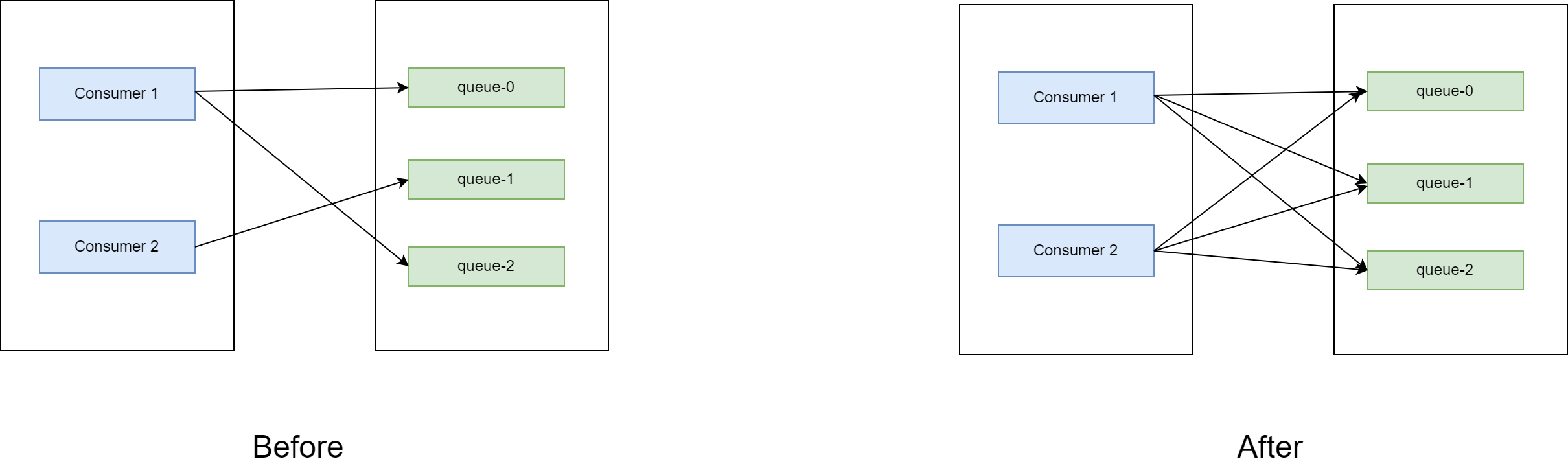
POP 模式下,消费位点由服务端进行管理,因此多个客户端可以消费同一个队列。使用 POP 消费模式的客户端,每个客户端都会从所有的队列去拉消息,因此解决了上述的单个客户端异常和消费瓶颈的问题。
同时,服务端维护消费信息,使得客户端 SDK 更加轻量,方便进行多语言移植。
代码示例
那么我们如何使用 POP 消费模式呢?
需要使用 5.x 的 gRPC SDK,引入相关依赖如下:
<dependencies><dependency><groupId>org.apache.rocketmq</groupId><artifactId>rocketmq-client-java</artifactId><version>5.0.6</version></dependency></dependencies>
同时参考开源社区的 DEMO 如下所示(以 Java 代码为例):
/** Licensed to the Apache Software Foundation (ASF) under one or more* contributor license agreements. See the NOTICE file distributed with* this work for additional information regarding copyright ownership.* The ASF licenses this file to You under the Apache License, Version 2.0* (the "License"); you may not use this file except in compliance with* the License. You may obtain a copy of the License at** http://www.apache.org/licenses/LICENSE-2.0** Unless required by applicable law or agreed to in writing, software* distributed under the License is distributed on an "AS IS" BASIS,* WITHOUT WARRANTIES OR CONDITIONS OF ANY KIND, either express or implied.* See the License for the specific language governing permissions and* limitations under the License.*/package org.apache.rocketmq.client.java.example;import java.time.Duration;import java.util.Collections;import java.util.List;import org.apache.rocketmq.client.apis.ClientConfiguration;import org.apache.rocketmq.client.apis.ClientException;import org.apache.rocketmq.client.apis.ClientServiceProvider;import org.apache.rocketmq.client.apis.SessionCredentialsProvider;import org.apache.rocketmq.client.apis.StaticSessionCredentialsProvider;import org.apache.rocketmq.client.apis.consumer.FilterExpression;import org.apache.rocketmq.client.apis.consumer.FilterExpressionType;import org.apache.rocketmq.client.apis.consumer.SimpleConsumer;import org.apache.rocketmq.client.apis.message.MessageId;import org.apache.rocketmq.client.apis.message.MessageView;import org.slf4j.Logger;import org.slf4j.LoggerFactory;public class SimpleConsumerExample {private static final Logger log = LoggerFactory.getLogger(SimpleConsumerExample.class);private SimpleConsumerExample() {}@SuppressWarnings({"resource", "InfiniteLoopStatement"})public static void main(String[] args) throws ClientException {final ClientServiceProvider provider = ClientServiceProvider.loadService();// Credential provider is optional for client configuration.String accessKey = "用户ak";String secretKey = "用户sk";SessionCredentialsProvider sessionCredentialsProvider =new StaticSessionCredentialsProvider(accessKey, secretKey);String endpoints = "腾讯云页面接入点";ClientConfiguration clientConfiguration = ClientConfiguration.newBuilder().setEndpoints(endpoints)// On some Windows platforms, you may encounter SSL compatibility issues. Try turning off the SSL option in// client configuration to solve the problem please if SSL is not essential.// .enableSsl(false).setCredentialProvider(sessionCredentialsProvider).build();String consumerGroup = "消费组";// 默认消费时间,30s,也就是说,对于拉到的消息,30s内如果消费没完成,该条消息会被别的客户端重新拉到,// 需要用户根据自己的场景配置Duration awaitDuration = Duration.ofSeconds(30);String tag = "*";String topic = "topic名字";FilterExpression filterExpression = new FilterExpression(tag, FilterExpressionType.TAG);// In most case, you don't need to create too many consumers, singleton pattern is recommended.SimpleConsumer consumer = provider.newSimpleConsumerBuilder().setClientConfiguration(clientConfiguration)// Set the consumer group name..setConsumerGroup(consumerGroup)// set await duration for long-polling..setAwaitDuration(awaitDuration)// Set the subscription for the consumer..setSubscriptionExpressions(Collections.singletonMap(topic, filterExpression)).build();// Max message num for each long polling.int maxMessageNum = 16;// Set message invisible duration after it is received.Duration invisibleDuration = Duration.ofSeconds(15);// Receive message, multi-threading is more recommended.do {final List<MessageView> messages = consumer.receive(maxMessageNum, invisibleDuration);log.info("Received {} message(s)", messages.size());for (MessageView message : messages) {final MessageId messageId = message.getMessageId();try {consumer.ack(message);log.info("Message is acknowledged successfully, messageId={}", messageId);} catch (Throwable t) {log.error("Message is failed to be acknowledged, messageId={}", messageId, t);}}} while (true);// Close the simple consumer when you don't need it anymore.// You could close it manually or add this into the JVM shutdown hook.// consumer.close();}}
在这种情况下,同一个消费组内,一个消费者将不会再和队列一一绑定,也能最大程度避免之前4.x中单个消费者阻塞导致队列堆积的问题。
文档反馈