PHP SDK
Baixar
Modo Foco
Tamanho da Fonte
Scenarios
This document introduces how to use an open-source SDK (taking the PHP SDK as an example) to send and receive messages, so as to help you better understand the complete process of sending and receiving messages.
Prerequisites
You have obtained the related client connection parameters as instructed in SDK Overview.
Operation Steps
Step 1: Installing the php-amqplib Library
According to the RabbitMQ official website, it is recommended to use the php-amqplib client. First, it is required to import the php-amqplib library into the project.
1. Add the
composer.json file to the project.{"require": {"php-amqplib/php-amqplib": ">=3.0"}}
2. Use Composer for installation.
composer.phar install
The following command can also be used:
composer install
3. Import the library files into the client files to create a client.
require_once('../vendor/autoload.php');
After the above steps are completed, a connection can be created for interaction with the server.
Step 2: Sending Messages
Create and compile a message production program (taking the direct exchange as an example).
require_once('../vendor/autoload.php');use PhpAmqpLib\\Connection\\AMQPStreamConnection;use PhpAmqpLib\\Message\\AMQPMessage;$exchange_name = 'exchange_name';$exchange_type = 'direct';// Create a connection.$connection = new AMQPStreamConnection($host,$port,$username,$password,$vhost,false,'PLAIN');// Establish a channel.$channel = $connection->channel();// Declare an exchange.$channel->exchange_declare($exchange_name, $exchange_type, false, true, false);// Set the message Routing Key.$routing_keys = array('info', 'waring', 'error');for ($x = 0; $x < count($routing_keys); $x++) {// Message content.$msg = new AMQPMessage('This is a direct[' . $routing_keys[$x] . '] message!');// Send a message to the specified exchange and set the Routing Key.$channel->basic_publish($msg, $exchange_name, $routing_keys[$x]);echo " [Producer(Routing)] Sent '" . $msg->body . "'\\n";}// Release resources.$channel->close();$connection->close();
Parameter | Description |
$exchange_name | Exchange name, which can be obtained from the exchange list in the console. |
$exchange_type | It should be consistent with the type of the above exchange. |
$host | Cluster access address, which can be obtained from the Client Access module on the basic cluster information page. |
$port | Port number in the cluster access address. |
$username | Username. Enter the username created in the console. |
$password | User password. Enter the password specified during user creation in the console. |
$vhost | Vhost name, which can be obtained from the vhost list in the console. |
$routing_keys[$x] | Routing Key bound to the consumer message queue, which is the routing rule for messages and can be obtained from the Binding Key column of the binding relationship list in the console. |
Step 3: Consuming Messages
Create and compile a message consumption program.
<?phprequire_once('../vendor/autoload.php');require_once('../Constant.php');use PhpAmqpLib\\Connection\\AMQPStreamConnection;$exchange_name = 'exchange_name';$exchange_type = 'direct';$queue_name = 'route_queue1';// Create a connection.$connection = new AMQPStreamConnection($host,$port,$username,$password,$vhost,false,'PLAIN');// Establish a channel.$channel = $connection->channel();// Declare an exchange.$channel->exchange_declare($exchange_name, $exchange_type, false, true, false);// Declare a message queue.$channel->queue_declare($queue_name, false, true, false, false);// Set the queue Routing Key.$routing_keys = array('info', 'waring', 'error');for ($x = 0; $x < count($routing_keys); $x++) {// Bind the message queue to the specified Exchange and set the Routing Key.$channel->queue_bind($queue_name, $exchange_name, $routing_keys[$x]);}echo " [Consumer1(Routing: info/waring/error)] Waiting for messages. To exit press CTRL+C\\n";// Message callback (message consumption logic).$callback = function ($msg) {echo ' [Consumer1(Routing: info/waring/error)] Received ', $msg->body, "\\n";};// Create a consumer to listen to the specified message queue.$channel->basic_consume($queue_name, '', false, true, false, false, $callback);while ($channel->is_open()) {$channel->wait();}// Disable resources.$channel->close();$connection->close();
Parameter | Description |
$exchange_name | Exchange name, which can be obtained from the exchange list in the console. |
$exchange_type | It should be consistent with the type of the above exchange. |
$queue_name | Queue name, which can be obtained from the queue list in the console. |
$host | Cluster access address, which can be obtained from the Client Access module on the basic cluster information page. |
$port | Port number in the cluster access address. |
$username | Username. Enter the username created in the console. |
$password | User password. Enter the password specified during user creation in the console. |
$vhost | Vhost name, which can be obtained from the vhost list in the console. |
$routing_keys[$x] | Routing Key supported by TDMQ for RabbitMQ. The Routing Key bound to the consumer message queue is the routing rule for messages and can be obtained from the Binding Key column of the binding relationship list in the console. |
Step 4: Viewing Messages
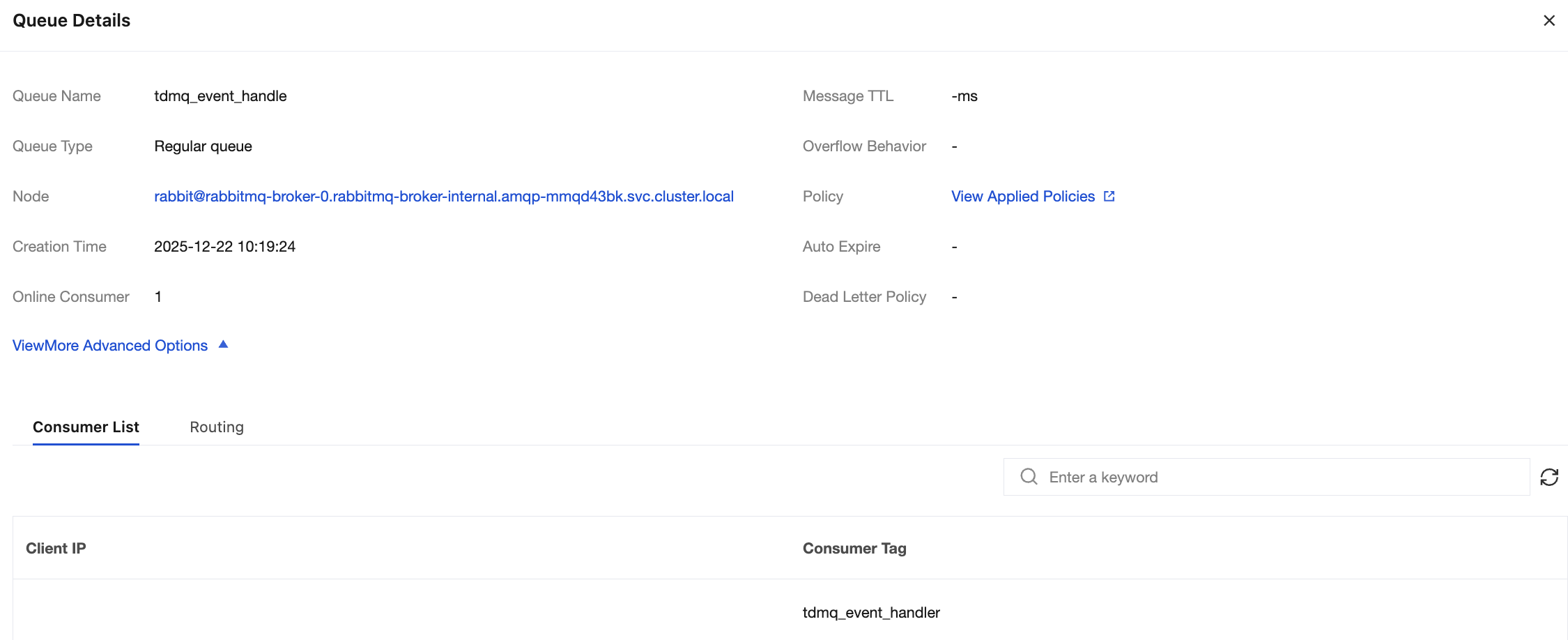
If you want to confirm whether the message is successfully sent to TDMQ for RabbitMQ, you can log in to the console and choose Cluster > Queue to go to the basic information page to view the details of consumers accessing the cluster.
Note:
Ajuda e Suporte
Esta página foi útil?
Você também pode entrar em contato com a Equipe de vendas ou Enviar um tíquete em caso de ajuda.
comentários