Spring Cloud Stream Integration
다운로드
포커스 모드
폰트 크기
Scenarios
This document introduces how to use an open-source SDK (taking the Spring Cloud Stream SDK as an example) to send and receive messages, so as to help you better understand the complete process of sending and receiving messages.
Prerequisites
You have obtained the related client connection parameters as instructed in SDK Overview.
Operation Steps
Step 1: Adding Dependencies
Add dependencies related to
Stream RabbitMQ to pom.xml.<dependency><groupId>org.springframework.cloud</groupId><artifactId>spring-cloud-stream</artifactId></dependency><dependency><groupId>org.springframework.cloud</groupId><artifactId>spring-cloud-starter-stream-rabbit</artifactId></dependency>
Step 2: Preparing Configurations
1. Configure accordingly in the configuration file (taking the configuration of the
direct exchange as an example).spring:application:name: application-namecloud:stream:rabbit:bindings:# Output channel name.output:# Producer configuration information.producer:# Type of the exchange used by the producer. If an exchange with the specified name already exists, the type must be consistent with that of the existing exchange.exchangeType: direct# It is used to specify a Routing Key expression.routing-key-expression: headers["routeTo"] # This value indicates that the routeTo field in the header information is used as the Routing Key.queueNameGroupOnly: true# Input channel name.input:# Consumer configuration information.consumer:# Type of the exchange used by the consumer. If an exchange with the specified name already exists, the type must be consistent with that of the existing exchange.exchangeType: direct# Routing Keys bound to the consumer message queue.bindingRoutingKey: info,waring,error# The configuration will process the above Routing Keys.bindingRoutingKeyDelimiter: "," # This configuration indicates that commas (,) are used to separate the configured Routing Keys.# Message acknowledgment mode. For more details, see AcknowledgeMode.acknowledge-mode: manualqueueNameGroupOnly: truebindings:# Output channel name.output: #Channel name.destination: direct_logs #Name of the exchange to be used.content-type: application/jsondefault-binder: dev-rabbit# Input channel name.input: #Channel name.destination: direct_logs #Name of the exchange to be used.content-type: application/jsondefault-binder: dev-rabbitgroup: route_queue1 # Name of the message queue to be used.binders:dev-rabbit:type: rabbitenvironment:spring:rabbitmq:host: amqp-xxx.rabbitmq.xxx.tencenttdmq.com #Cluster access address, which can be obtained by clicking Get Access Address in the Operation column on the cluster management page.port: 5672username: admin #Role name.password: password #Role token.virtual-host: vhostnanme #Vhost name.
Parameter | Description |
bindingRoutingKey | Routing Key bound to the consumer message queue, which is the routing rule for messages and can be obtained from the Binding Key column of the binding relationship list in the console. |
direct_log | Exchange name, which can be obtained from the exchange list in the console. |
route_queue1 | Queue name, which can be obtained from the queue list in the console. |
host | Cluster access address, which can be obtained from the Client Access module on the basic cluster information page. |
port | Cluster access address port, which can be obtained from the Client Access module on the basic cluster information page. |
username | Username. Enter the username created in the console. |
password | User password. Enter the password specified during user creation in the console. |
virtual-host | Vhost name, which can be obtained from the vhost list in the console. |
2. Create a configuration file loading program.
OutputMessageBinding.java
public interface OutputMessageBinding {/*** Name of the channel to be used (output channel name).*/String OUTPUT = "output";@Output(OUTPUT)MessageChannel output();}
InputMessageBinding.java
public interface InputMessageBinding {/*** Name of the channel to be used.*/String INPUT = "input";@Input(INPUT)SubscribableChannel input();}
Step 3: Sending Messages
Create and compile the message sending program IMessageSendProvider.java.
// Import the configuration class.@EnableBinding(OutputMessageBinding.class)public class MessageSendProvider {@Autowiredprivate OutputMessageBinding outputMessageBinding;public String sendToDirect() {outputMessageBinding.output().send(MessageBuilder.withPayload("[info] This is a new message.[" + System.currentTimeMillis() + "]").setHeader("routeTo", "info").build());outputMessageBinding.output().send(MessageBuilder.withPayload("[waring] This is a new waring message.[" + System.currentTimeMillis() + "]").setHeader("routeTo", "waring").build());outputMessageBinding.output().send(MessageBuilder.withPayload("[error] This is a new error message.[" + System.currentTimeMillis() + "]").setHeader("routeTo", "error").build());return "success";}public String sendToFanout() {for (int i = 0; i < 3; i++) {outputMessageBinding.output().send(MessageBuilder.withPayload("This is a new message" + i).build());}return "success";}}
Inject the
MessageSendProvider into the class that sends messages to perform message sending.Step 4: Consuming Messages
Create and compile the message consumption program MessageConsumer.java. Multiple channels can be configured to listen to different message queues.
@Service@EnableBinding(InputMessageBinding.class)public class MessageConsumer {@StreamListener(InputMessageBinding.INPUT)public void test(Message<String> message) throws IOException {Channel channel = (com.rabbitmq.client.Channel) message.getHeaders().get(AmqpHeaders.CHANNEL);Long deliveryTag = (Long) message.getHeaders().get(AmqpHeaders.DELIVERY_TAG);channel.basicAck(deliveryTag, false);String payload = message.getPayload();System.out.println(payload);}}
Step 5: Viewing Messages
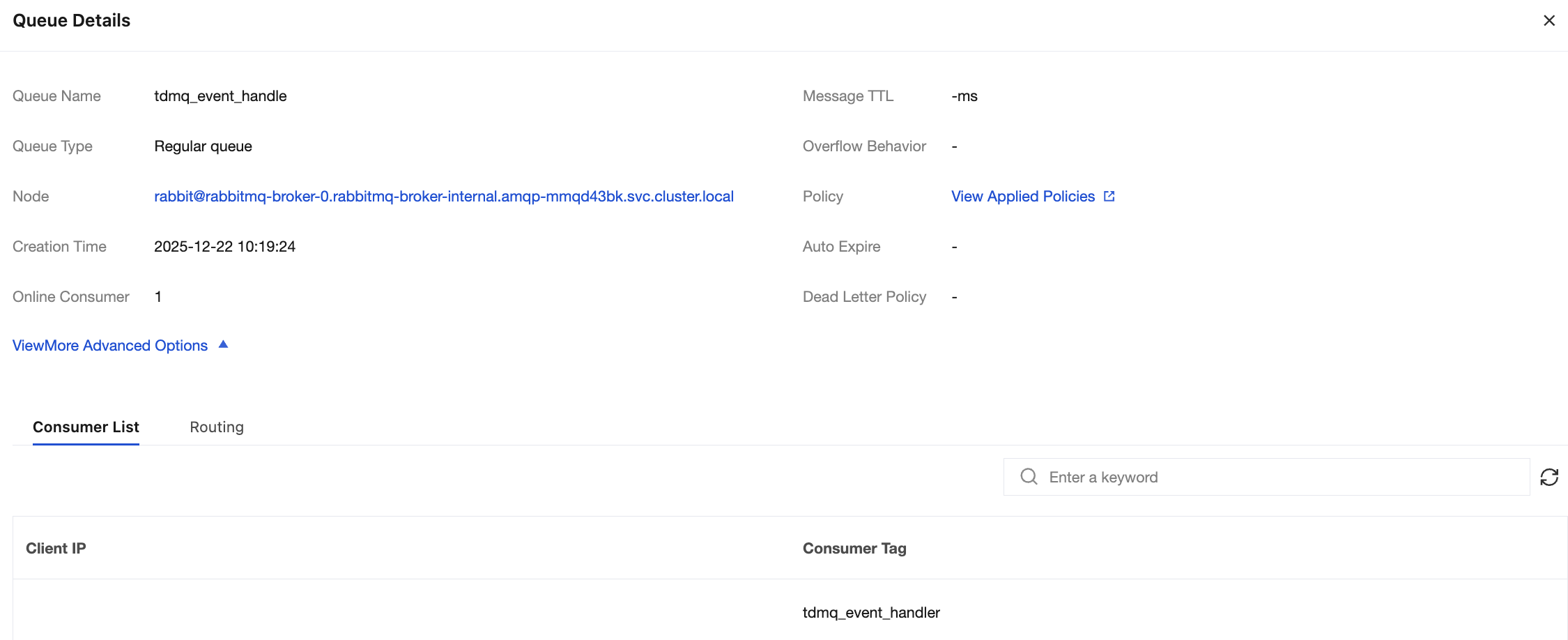
If you want to confirm whether the message is successfully sent to TDMQ for RabbitMQ, you can log in to the console and choose Cluster > Queue to go to the basic information page to view the details of consumers accessing the cluster.
Note:
Above is a simple example based on the publish/subscribe model of RabbitMQ. Different configurations can be performed according to the actual usage requirements. For more details, see Demo or the Spring Cloud Stream official website.
피드백