tencent cloud

Event Bridge

Release Notes and Announcements
Release Notes
[July 19, 2024] Solution to CLS Billing Issues for EB Topics
User Tutorial
Product Introduction
Overview
Basic Concepts
Strengths
Use Cases
Limits
Purchase Guide
Billing Overview
Product Pricing
Overdue Payments and Service Suspension
Getting Started
Activating EventBridge
Quickly Delivering Custom Events
Quickly Configuring Cloud Monitor Event Alarm Push
Event Source
Overview
Tencent Cloud Service Event Source
Event Structure
Connector
Event
Event Structure
Custom Event
Tencent Cloud Service Event
Event Bus
Overview
Creating Event Bus
Managing Event Bus
Linkage Tracing
Event Rule
Overview
Event Pattern
Creating Event Rule
Managing Event Rule
Configuring Data Conversion
Event Target
SCF Target
CLS Log Target
Message Push Target
CKafka Target
Practical Tutorial
Migrating Event Alarm
Real-Time Oceanus Alarm Message Push
Automatic Backup and Restart of Exceptional CVM Instance
Planning a EventBridge-based Midplatform for a Retail Business
API Documentation
History
Introduction
API Category
Making API Requests
Delivery Target APIs
Event Bus APIs
Event Rule APIs
Event Connector APIs
Data Transformer APIs
Event Storage APIs
Data Types
Error Codes
FAQs
Concept
Alarm
Billing
Contact Us
EB Policy
Privacy Policy
Data Processing And Security Agreement

Creating Event Rule

PDF
Focus Mode
Font Size
Last updated: 2024-07-23 15:08:07
Event rule is one of the most basic resource units in EventBridge. You can configure an event bus to receive events from an event source and use event rules to filter events. This document describes how to create an event rule in the EventBridge console.

Prerequisites

Directions

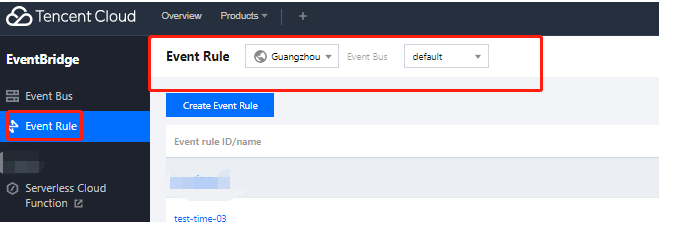
1. Log in to the EventBridge console and select Event Rule on the left sidebar.
2. At the top of the Event Rule list page, select the event bus and region for the event rule to be created.


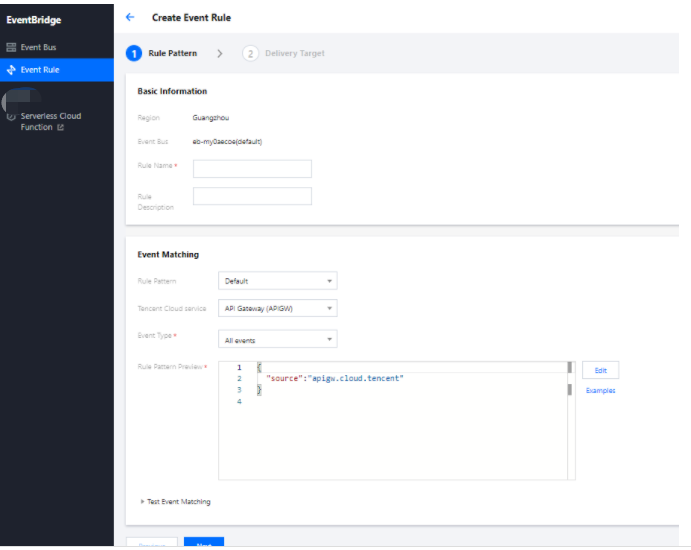
3. Click Create Event Rule and enter the relevant information as prompted as shown below:


Event matching: Used for event filtering. You can specify what events can be matched. You can configure a custom event matching pattern or select an existing template rule. As shown in the figure above, all events from the TDMQ message queue can be matched. For more information about event pattern rules, see Event Pattern.
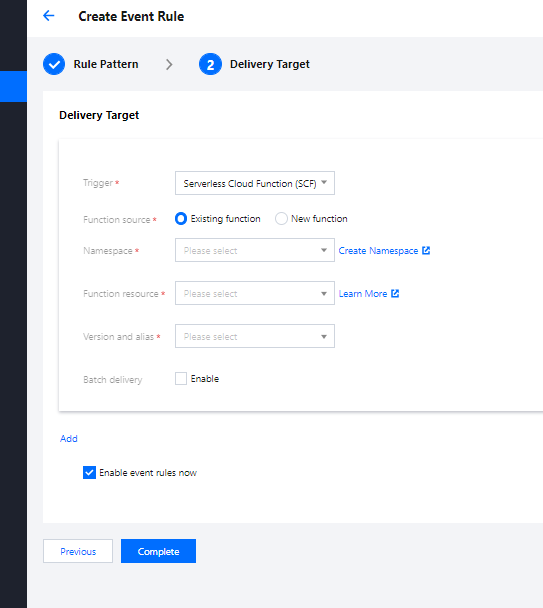
Delivery target: Specifies the target that is eventually triggered by events.
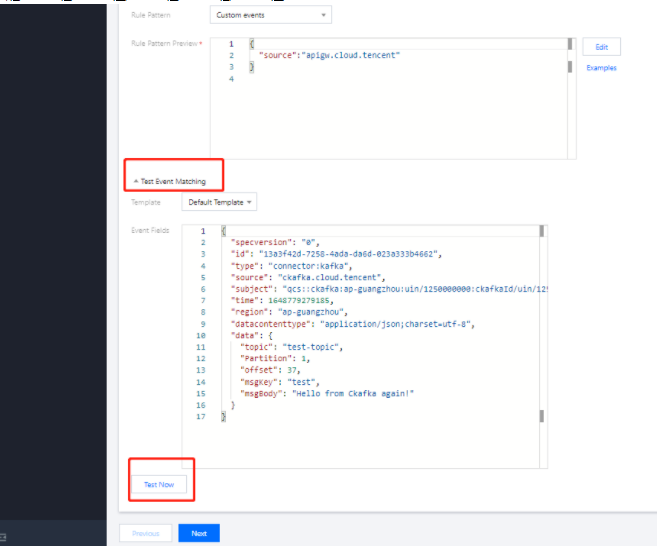
4. Click to expand Test Event Matching. Then you can test the defined event pattern. Template is preset with all currently supported templates for events generated by Tencent Cloud services and templates for events generated by connectors.


5. Click Next and select the event targets to bind to the current event rule. An event rule can be bound to multiple event targets.

EventBridge supports the following event targets, and you can click the links to view their configuration methods:
Help and Support

Was this page helpful?

Help us improve! Rate your documentation experience in 5 mins.

Feedback