tencent cloud

IoT Hub

Release Notes and Announcements
Release Notes
Product Introduction
Overview
Features
Strengths
Use Cases
Use Limits
Basic Concepts
Getting Started
Quick Start
Scenario 1: Device Interconnection
Scenario 2: Device Status Reporting and Setting
MQTT.fx Connection Guide
Console Guide
Product Management
Rule Engine
Sub-account Access to IoT Hub
Firmware Upgrade
Resource Management
Certificate Management
Developer Manual
Feature Components
Signature Algorithm
Device Authentication
Device Connection Protocol
Gateway Subdevice
Message Communication
Device Shadow
Device Firmware Upgrade
Remote Device Configuration
Resource Management
Device Log Reporting
NTP Service
Device Connection Manual
Device Connection Overview
Connection Based on SDK for C
Connection Based on SDK for Android
Connection Based on SDK for Java
Connection Based on SDK for Python
API Documentation
History
Introduction
API Category
Making API Requests
Device Shadow APIs
Device APIs
CA Certificate APIs
Product APIs
Data Types
Error Codes
FAQs
General
Device Connection and Reporting
Rule Engine
Console
IoT Hub Policy
Privacy Policy
Data Privacy And Security Agreement
Glossary

Overview

PDF
Focus Mode
Font Size
Last updated: 2024-12-27 09:54:58

Overview

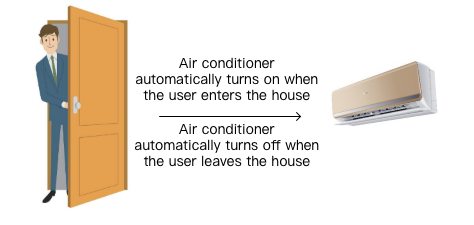
If you need to achieve the features as shown below in a smart home scenario (this is not a real product but only used to demonstrate IoT Hub's capabilities), you can follow the steps in this document.
come_home


Solution

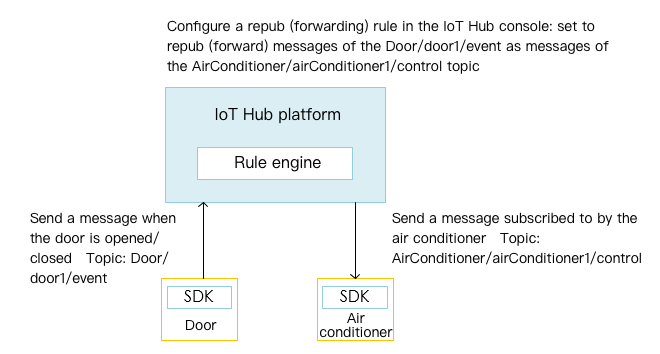
Two types of smart devices (door and air conditioner) can be created in the IoT Hub SDK and connected with each other based on cross-device messaging and the rule engine as shown below:
rule_engine_for_smart_home

Note:
airConditioner1 cannot achieve message communication by directly subscribing to the update messages of door1. For the reason, please see Feature Components - Permission Management.
Help and Support

Was this page helpful?

Help us improve! Rate your documentation experience in 5 mins.

Feedback