Adaptive Load Balancing
Download
Modo Foco
Tamanho da Fonte
The TDSQL-C for MySQL database proxy provides an adaptive CLB feature. Based on backend load conditions, it routes requests to instances with lower loads. This achieves load balancing across database instances and ensures their response speed.
Background Information
In database usage scenarios where multiple read-only instances are deployed, a database proxy is typically required for CLB. This allows multiple read-only instances to share the request load, thereby reducing the pressure on the primary instance. Currently, the TDSQL-C for MySQL database proxy supports CLB by assigning a read weight to each read-only instance. This is a "static" CLB capability, which ensures that each read-only instance receives a corresponding number of requests based on its assigned read weight.
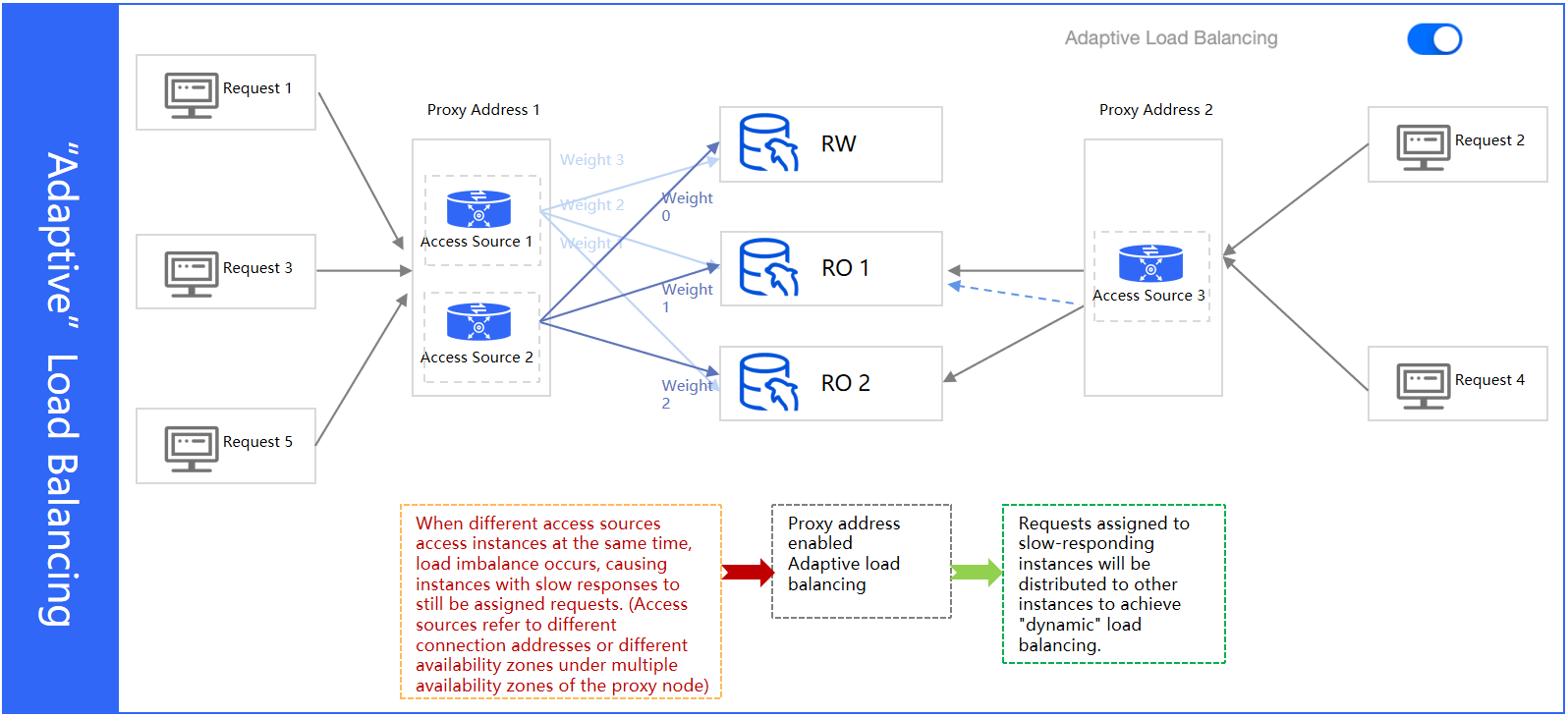
When different services access an instance simultaneously from different database proxy connection addresses, load imbalance may occur. This phenomenon may not be resolved by the "static" CLB capability.
For example, a user has one read-write instance and two read-only instances (RO1, RO2). RO2 is used by two database proxy connection addresses. When the load on RO2 increases, this "static" CLB capability results in a fixed number of requests being assigned to it. Consequently, even if RO2's response slows down, it continues to receive requests, which slows down the overall response speed. Therefore, the TDSQL-C for MySQL database proxy provides an adaptive CLB feature. When it detects that RO2's requests are slowing down and its load is too high, the database proxy reduces the number of requests routed to RO2. It then assigns these requests to other read-only instances with fewer active connections. This achieves "dynamic" CLB and ensures the overall response speed of the database instances.
Prerequisites
The instance status is Running.
The database proxy kernel minor version 1.3 must be 1.3.8 or later, and version 1.4 must be 1.4.7 or later. If your versions do not meet these requirements, see Upgrading the Database Proxy Kernel Minor Version.
The database kernel version requirements are as follows. If your version does not meet them, see Upgrading the Database Kernel Minor Version.
TDSQL-C for MySQL 5.7: 2.0.20/2.1.6 or later.
TDSQL-C for MySQL 8.0: 3.1.6 or later.
Scenarios
If the overall load on your instances is high, and a specific read-only instance becomes fully loaded while others are not, the proxy with adaptive CLB enabled will prioritize routing requests to instances that can still respond. This allows for full utilization of all instance resources. Note that if an instance becomes fully loaded due to unreasonable slow SQL statements, adaptive CLB may cause all instances to experience high load. In this case, you still need to resolve the slow SQL issue.
If all your instance specifications are identical and the configured weights for all instances are the same, you can directly enable adaptive CLB when you need to distribute traffic evenly. This can meet the requirements of almost all scenarios.
In the following scenarios, we do not recommend that you enable the adaptive CLB feature:
1. If you have only one database proxy connection address, we recommend using "static" CLB and advise against enabling the adaptive CLB feature.
2. After you enable the adaptive CLB feature, requests may not be routed according to the configured read weight under low load conditions. If you require strict adherence to the configured read weight for routing, we do not recommend enabling the adaptive CLB feature.
3. When a single read-only instance becomes fully loaded due to slow SQL statements, CLB cannot alleviate the issue. In this case, we do not recommend enabling the adaptive CLB feature. Instead, we recommend prioritizing SQL optimization or upgrading instance specifications to resolve the problem.
Note
Changes to the CLB policy take effect only for new connections established after the configuration is updated. If existing connections are present, you may need to perform the load rebalancing operation to make the policy effective for old connections.
"Dynamic" CLB takes effect only for traffic that passes through the database proxy. If traffic bypasses the database proxy and connects directly to the database, the CLB policy may become unstable.
When the configuration for a database proxy connection address is adjusted, we recommend that you set the custom weight ratio by referencing the ratio of CPU cores among read-only instances. This helps prevent an increased risk of read-only instance failure, which can occur if the custom weight ratio contradicts the request-handling capacity of the read-only instances.
Enabling/Disabling Adaptive Load Balancing
Note:
The following steps apply only to enabling/disabling adaptive CLB. For detailed settings and explanations under configuration adjustments, including the rules and impact of adjusting read weights, see Set Database Proxy Connection Address.
1. Log in to the TDSQL-C for MySQL console, select the cluster with the proxy enabled in the cluster list, and click the Cluster ID to enter the cluster management page.
2. On the cluster management page, choose Database Proxy > Overview. Under Connection Address, find the target access address and click Adjust Configurations in its Operation column.

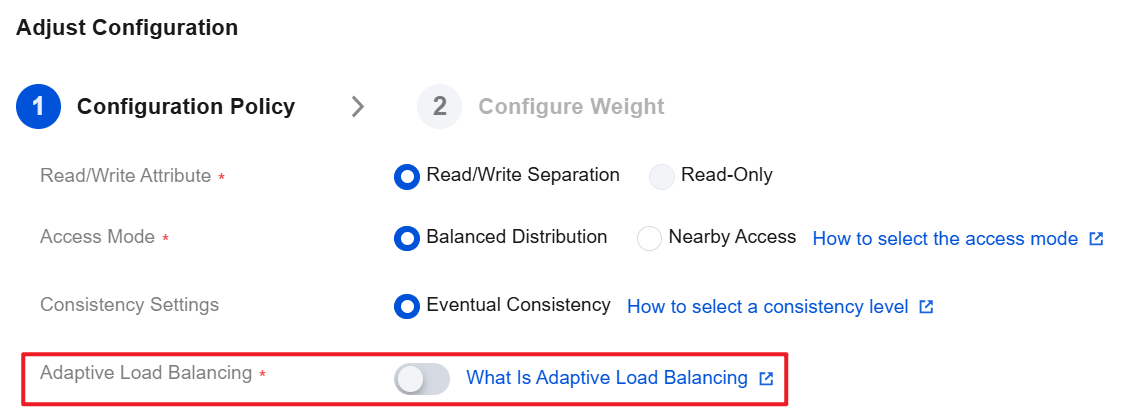
3. On the Adjust Configuration page, enable or disable the Adaptive Load Balancing button as needed, and then click OK.
Ajuda e Suporte
Esta página foi útil?
Você também pode entrar em contato com a Equipe de vendas ou Enviar um tíquete em caso de ajuda.
comentários