Modifying Database Account Permission
下载
聚焦模式
字号
TDSQL-C for MySQL allows you to grant and modify database account permissions. As the root account has the read-write permissions of all databases in a TDSQL-C for MySQL cluster, you cannot modify the permissions of the root account. You can grant other accounts the read-write or read-only permissions for created databases on the database management page.
Prerequisites
You have created an account other than the root account in your TDSQL-C for MySQL cluster as instructed in Creating Account.
You have created at least one database in your TDSQL-C for MySQL cluster as instructed in Creating Database.
Directions
1. Log in to the TDSQL-C for MySQL console.
2. Select a region at the top and proceed according to the actually used view mode.
Click Target Cluster in the cluster list on the left to enter the cluster management page.

Find the target cluster in the cluster list and click the Cluster ID or Manage in the Operation column to enter the cluster management page.

3. On the cluster management page, select the Database Management tab and click Modify in the Operation column of the target database.

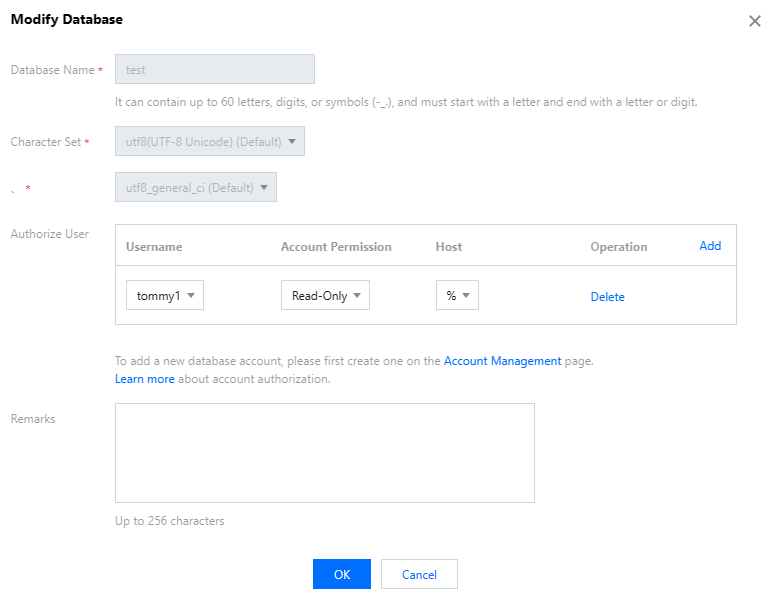
4. In the pop-up window, modify the permissions of the account and click OK.
Note:
For more information on account authorization, see Creating Database > Account authorization details.
文档反馈