Private DNS supports subdomain recursive DNS. When a client initiates a DNS request, if the corresponding subdomain DNS record is not configured for the private domain, Private DNS will return the corresponding record according to whether this feature is enabled.
If subdomain recursive DNS is not enabled, the SOA record will be returned.
If subdomain recursive DNS is enabled, the public DNS record will be returned.
For example, the private domain dnspod.cn has the following three private records:
Host
Record Type
Record Value
TTL
01
A
1.1.1.1
600
02
A
1.1.1.2
600
03
A
1.1.1.3
600
When you initiate DNS requests for 01.dnspod.cn, 02.dnspod.cn, and 03.dnspod.cn, private records 1.1.1.1, 1.1.1.2, and 1.1.1.3 will be returned, respectively.
When you initiate DNS requests for public domain names such as www.dnspod.cn, bbs.dnspod.cn, and rss.dnspod.cn, recursive queries will be performed, and public DNS results of the actual internet domain names will be used as the final DNS response results.
Directions
Enabling subdomain recursive DNS
Method 1
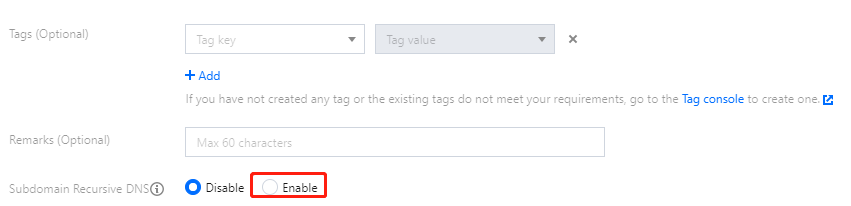
You can choose to enable subdomain recursive DNS when adding a private domain for the first time as shown below. For detailed directions, please see Creating Private Domain.
Method 2
1. Log in to the Private DNS console and click Private Domain List on the left sidebar to enter the private domain list.
2. In the Private Domain List, select the private domain for which you want to enable subdomain recursive DNS and click DNS to enter its DNS Records page.
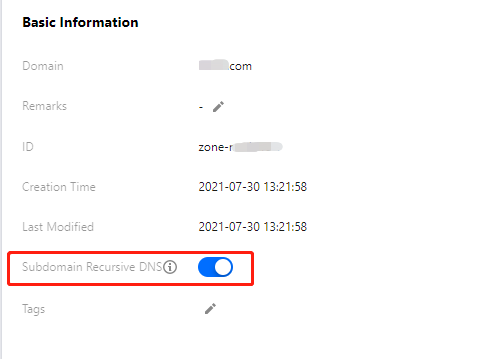
3. Select the Private Domain Settings tab and click
, to enable this feature as shown below:
Disabling subdomain recursive DNS
1. Log in to the Private DNS console and click Private Domain List on the left sidebar to enter the private domain list.
2. In the Private Domain List, select the private domain for which you want to disable subdomain recursive DNS and click DNS to enter its DNS Records page.
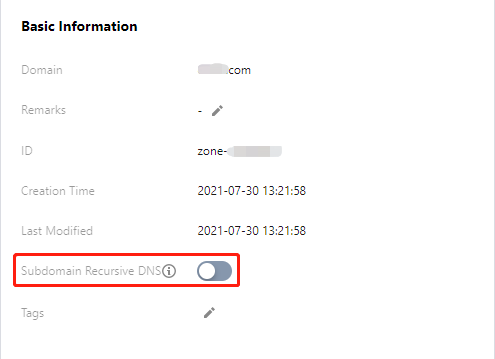
3. Select the Private Domain Settings tab and click