tencent cloud

Private DNS

Release Notes
Product Introduction
Overview
Strengths
Use Limits
Scenarios
Purchase Guide
Billing Overview
Value-Added Service Packages
Non-Standard TLDs
Getting Started
Activating Private DNS
Creating Private Domain
Deleting Private Domain
Modifying Associated VPC
Operation Guide
Setting DNS Record
Modifying DNS Record
Deleting DNS Record
Importing DNS Records
Exporting DNS Records
Associating the VPCs of Another Account
Bulk Operation
Reverse DNS and PTR Record
Subdomain Recursive DNS Description
DNS Statistics Description
Round-Robin DNS Description
Recursive Resolution Description
Cloud Access Management
Cloud Access Management Overview
Authorizable Resource Types
Sample Access Management Policy
Use Cases
Configuring the NSCD Service for Cache Acceleration to Improve DNS Availability
API Documentation
History
Introduction
API Category
Making API Requests
Private DNS APIs
Data Types
Error Codes
FAQs
Private DNS
Will Private DNS override public domain names?
PDNS Policy
Privacy Policy
Data Processing And Security Agreement
Related Agreement
Private DNS Service Level Agreement
Glossary

Modifying DNS Record

PDF
Focus Mode
Font Size
Last updated: 2024-12-31 16:15:39

Overview

This document describes how to modify your record as needed.

Directions

1. Log in to the Private DNS console and click Private Domain List on the left sidebar to enter the private domain list.
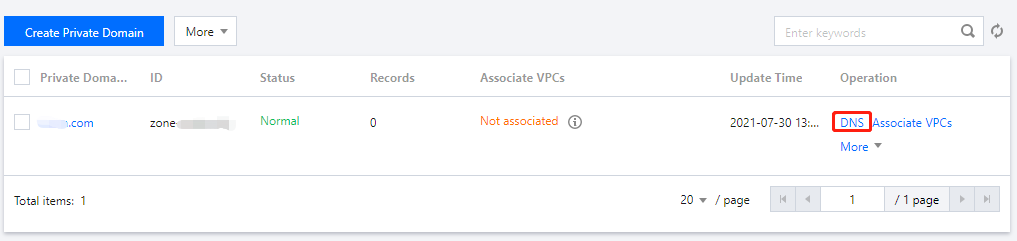
2. In the Private Domain List, select the domain for which you want to modify a record or click DNS in the Operation column to enter its DNS Records page as shown below:

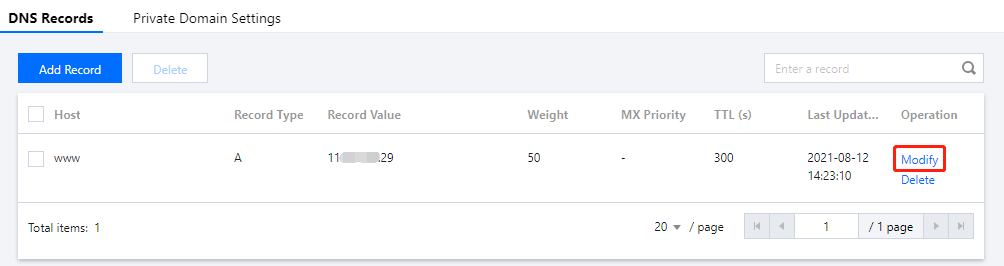
3. Select the record you need to modify and click Modify in the Operation column as shown below:

4. Modify the record and click Save to complete the modification.
Help and Support

Was this page helpful?

Help us improve! Rate your documentation experience in 5 mins.

Feedback