This document describes how to create a private domain in the Private DNS console.
Directions
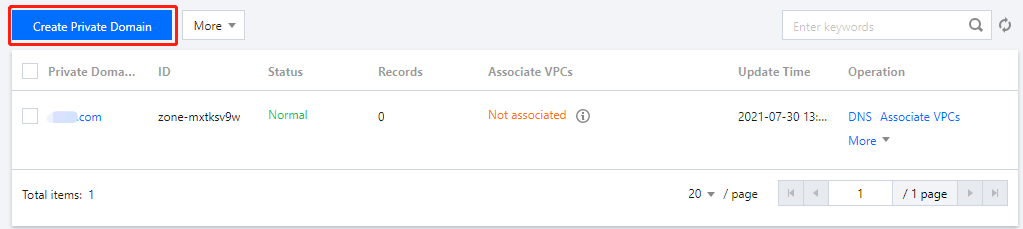
1. Log in to the Private DNS console and click Private Domain List on the left sidebar to enter the private domain list.
2. In the Private Domain List, click Create Private Domain as shown below:
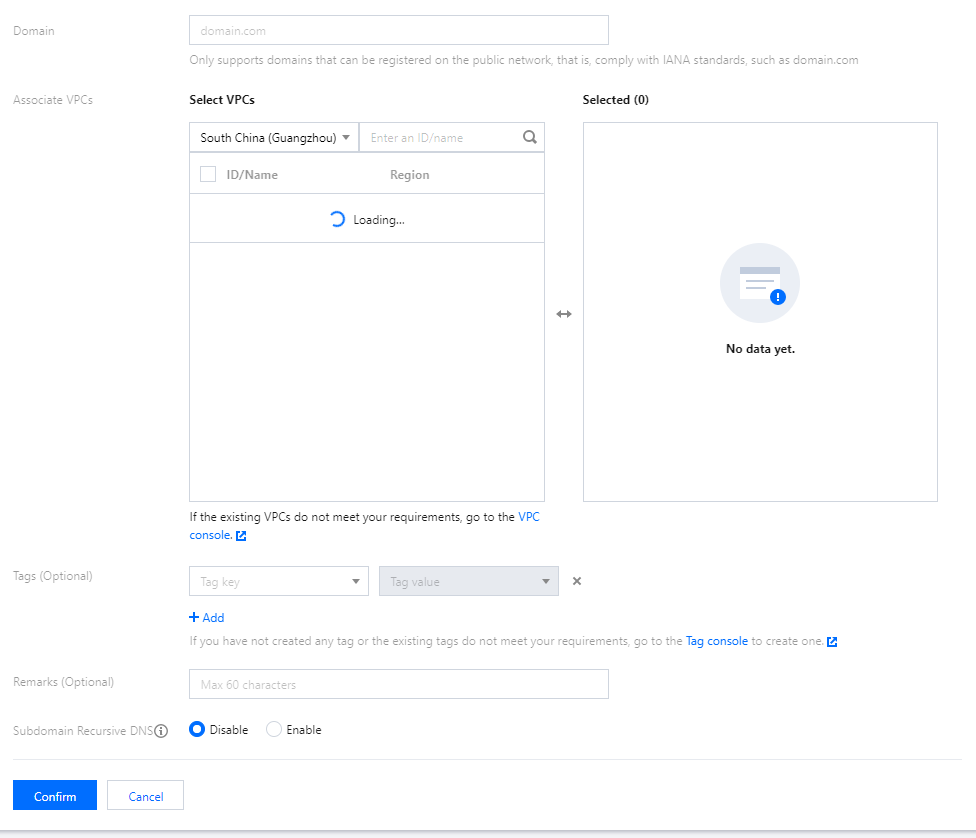
3. On the Create Private Domain page, enter the private domain information as shown below:
Domain: enter the custom private domain name you want to create, i.e., the private domain name you want to associate with and use in a VPC.
Note:
You can only create standard TLD domain names that comply with the IANA specifications.
After creating the private domain name, you need to set a DNS record for it and associate it with a VPC, and the record takes effect only in the associated VPC.
Associate VPCs: select a VPC created in one of the regions currently supported by Private DNS for association. Private domain names with the same name cannot be associated with the same VPC.
Note:
For a better experience, we recommend you create a private domain name and set a DNS record for it first before associating a VPC.
If no VPCs are displayed in the currently selected region, please create one in the VPC console.
If existing VPCs cannot meet your needs, you can modify them in the VPC console.
Tags: select a tag, through which you can categorize, search for, and aggregate Tencent Cloud resources. For more information, please see Product Overview.
Remarks: enter the remarks of the private domain.
Subdomain Recursive DNS: select an option as needed. This feature is disabled by default. For more information, please see Subdomain Recursive DNS.
4. Click Confirm to create the private domain.
Subsequent Operations
For a private domain that has DNS records added, the value of Records in the private domain list represents the number of DNS records of the private domain.
In the Private DNS console, click the name of the "private domain" you need to resolve to enter the DNS records page, where you can add records for the private domain. For detailed directions, please see Setting DNS Record.