Use of GitHub Actions in TEM
Baixar
Modo Foco
Tamanho da Fonte
Use of GitHub Actions in TEM
GitHub Actions
TEM integrates world-class CI/CD tools to facilitate your use of GitHub workflows. You can learn more by referring to the official documentation of GitHub Actions.
Note:
GitHub Actions makes it easy to automate all your software workflows, now with world-class CI/CD.
Application release types supported by TEM
The TEM platform uses cloud native as its infrastructure, where all applications exist in the form of containers at runtime. TEM especially supports the release of JAR and WAR packages for Java applications and takes care of the build and management of images. For other languages, you need to build images on your own and push them to Tencent Cloud Image Registry.
How to use
The following takes .NET as an example to describe how to use GitHub Actions.
name: .NETon:push:branches: [ master ]pull_request:branches: [ master ]jobs:build:runs-on: ubuntu-lateststeps:- uses: actions/checkout@v2- name: Setup .NETuses: actions/setup-dotnet@v1with:dotnet-version: 5.0.x- name: Declare some variablesid: varsshell: bashrun: |echo "::set-output name=sha_short::$(git rev-parse --short HEAD)"- name: Build Coderun: dotnet publish -o ./target- name: Set up Docker Buildxuses: docker/setup-buildx-action@v1- name: Login to Registryuses: docker/login-action@v1with:registry: ${{ secrets.REGISTRY_URL }}username: ${{ secrets.REGISTRY_USERNAME }}password: ${{ secrets.REGISTRY_TOKEN }}- name: Build and pushuses: docker/build-push-action@v2with:context: .push: trueplatforms: linux/amd64,linux/arm64tags: ccr.ccs.tencentyun.com/han_test/my-web-app:${{ steps.vars.outputs.sha_short }}
1. Your code repository should include the
dockerfile file for use by the built action.FROM mcr.microsoft.com/dotnet/aspnet:5.0COPY ./target /appWORKDIR /appENTRYPOINT ["dotnet", "myWebApp.dll"]
2. Here,
commitId is used as the image tag, which makes it easier to confirm the runtime's application code version. If you don't need this, you can directly use the latest image tag.git rev-parse --short HEAD
3. Tencent Cloud Image Registry Personal Edition requires your login information. The account information will automatically pop up when you open the Personal Edition page for the first time. The Enterprise Edition works in a similar way. You can find relevant documents by yourself.
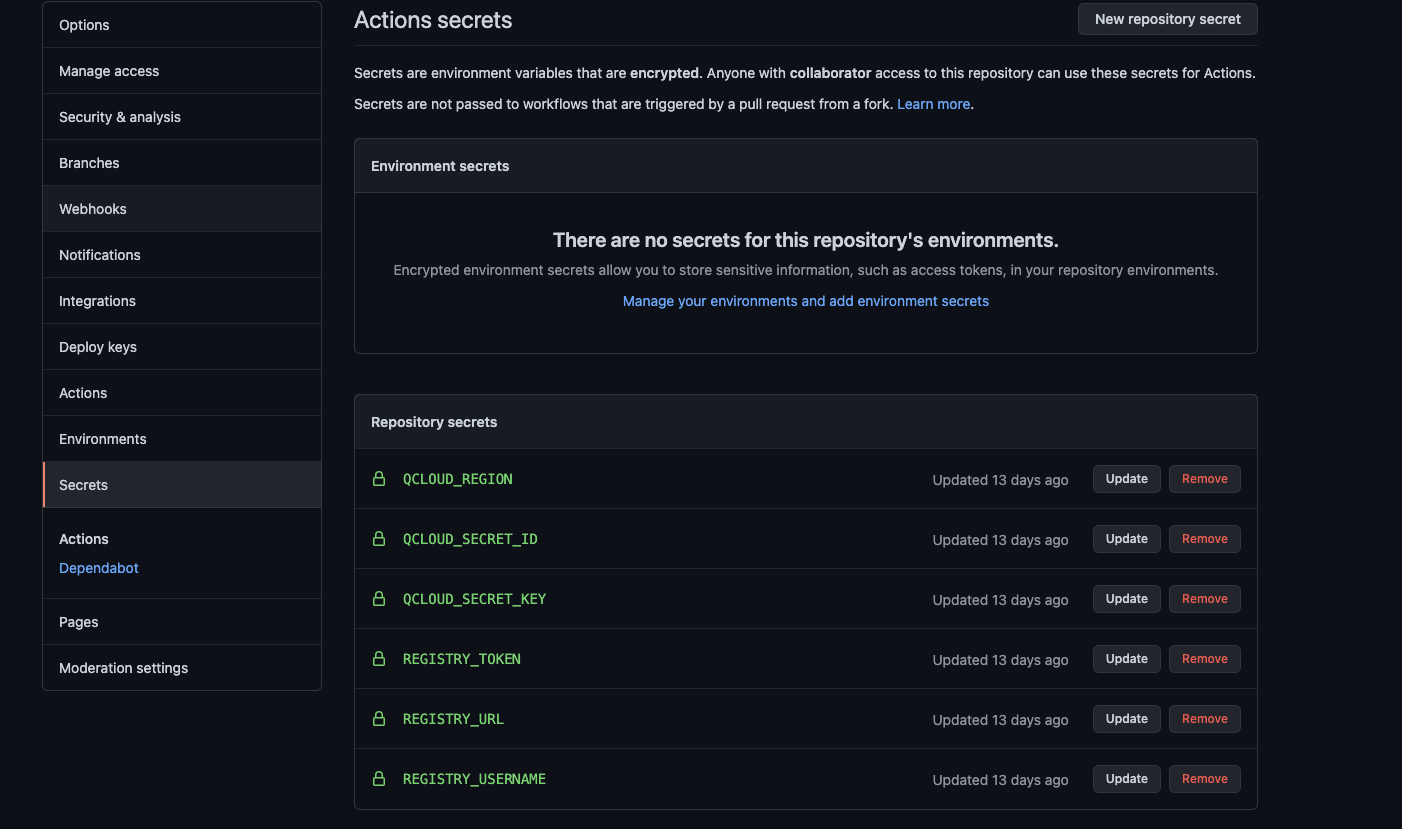
- name: Login to Registryuses: docker/login-action@v1with:registry: ${{ secrets.REGISTRY_URL }}username: ${{ secrets.REGISTRY_USERNAME }}password: ${{ secrets.REGISTRY_TOKEN }}
4. Relevant keys can be managed by using the Secrets module on the Repository Settings page.
Ajuda e Suporte
Esta página foi útil?
Você também pode entrar em contato com a Equipe de vendas ou Enviar um tíquete em caso de ajuda.
comentários