Deleting a Custom Credential
ダウンロード
フォーカスモード
フォントサイズ
This document guides you on how to delete unused custom secrets in the SSM console. To prevent service interruption caused by accidental deletion, SSM adopts a scheduled deletion mechanism: a mandatory waiting period of 0 to 30 days is enforced for deletion operations, after which the system automatically performs permanent deletion.
Deleting a Custom Credential
1. Log in to the SSM console, and click Custom Secrets in the left sidebar.
2. On the Custom Secrets list page, select the credentials you want to schedule for deletion, and click Schedule Deletion in the Operations column.
Note:
The scheduled deletion operation is only supported for credentials that are in the disabled state. If a credential is currently enabled, you must disable it first before you can schedule its deletion.
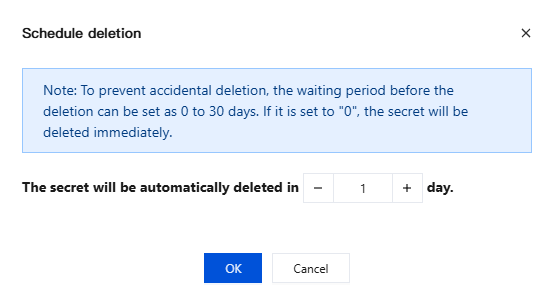
3. In the Schedule Deletion window, enter the scheduled deletion period in days and click OK. The credential will be permanently deleted automatically by the system upon expiration.
Note:
If you select a waiting period of "0" days, the credential will be deleted immediately.
Credentials in the pending deletion state cannot be read or used. Before deletion, confirm that the relevant applications have completed credential migration.
Once permanently deleted, credential data cannot be recovered. Proceed with caution.
4. During the 1 to 30-day waiting period, you can cancel the deletion of credentials scheduled for deletion.
Restoring a Deleted Item
Before the scheduled deletion period expires, you can cancel the deletion plan and restore the credential to its normal usable state.
1. In the Custom Secrets list, locate the target credential whose status is pending deletion.
2. Click Cancel Deletion in the Operations column.
3. In the confirmation dialog box that appears, click OK to cancel the deletion of the credential.
4. After you confirm the deletion cancellation, the credential status will be reset to "Enabled" and can be read and used normally.
フィードバック