업로드 실패: Tencent Cloud COS SDK 또는 콘솔을 통한 파일 업로드 실패입니다. 일반적인 HTTP 오류 코드는 4XX, 5XX 등 입니다. 이 때 COS 이벤트 알림이 트리거되지 않으며, MPS도 트랜스코딩 작업을 시작하지 않습니다. 파일이 성공적으로 업로드되었는지 확인하십시오.
업로드 성공, 트랜스코딩이 트리거되지 않음: 가능한 원인: 워크플로 미설정 또는 워크플로 설정 오류 등. 워크플로가 올바르게 설정되었는지 확인하십시오.
트랜스코딩 시작에 실패하면 어떻게 합니까?
가능한 원인과 해결 방법은 다음과 같습니다.
요청 매개변수 오류: API가 오류를 반환하는 경우, API 매개변수 요구사항을 확인하여 API 호출이 성공적으로 반환되는지 확인하십시오.
권한 없음: API가 권한 관련 문제를 반환하는 경우, COS 및 CMQ 관련 리소스에서 MPS를 승인했는지 확인하십시오.
트랜스코딩에 실패하면 어떻게 해야 합니까?
트랜스코딩 실패는 트랜스코딩 서비스에서 제공하는 다양한 유형의 하위 작업(트랜스코딩, 스크린샷, 워터마킹, 스마트 인식 및 스마트 분석 배포)의 실패를 의미합니다.
반환된 오류 코드에 따라 다음과 같이 오류 유형을 확인할 수 있습니다.
소스 파일의 메타 정보가 잘못되었거나 지원하지 않는 형식입니다.
스크린샷 실패(비디오 스트림 없음), 알 수 없는 오류 등.
소스 파일과 관련된 오류인 경우, 파일 메타 정보 및 인코딩 매개변수가 올바른지 확인하십시오. 다른 유형의 오류인 경우 티켓 제출하십시오.
비디오를 일괄 다운로드하는 방법은 무엇입니까?
MPS는 현재 비디오 일괄 다운로드를 지원하지 않습니다.
ps 파일을 다운로드할 수 있습니까?
지원되지 않습니다. 다운로드 가능한 파일 형식은 아래 표를 참고하십시오.
파일 형식
비디오 인코딩 유형
오디오 인코딩 유형
MP4
H.264, H.265
AAC
FLV
H.264, H.265
AAC
MOV
H.264, H.265, MPEG4
AAC
WMV
WMV1, WMV2
WMA1, WMA2
MKV
H264, VP8, MPEG4
AAC
AVI
H264, WMV1, WMV2, MPEG4
AAC, WMA1, WMA2
RMVB
RV 시리즈
RAAC, RACP
TS
H.264, MP1V, MP4V
MP1, MP2, MP3, MP4A
MPG
MPEG1, MPEG2
MP2
3GP
H263, MPEG4
AMR, AAC
비디오 트랜스코딩이 지정된 비트레이트로 출력되지 않습니다.
기본적으로 MPS는 시각적 경험에 영향을 주지 않는 전제 하에, 불필요한 프레임의 품질을 낮추고 특정 출력 비트레이트를 따르지 않아, 비트레이트를 줄이는 효과가 있습니다.
지정된 비트레이트에 따라 출력하려면 티켓 제출을 통해 해당 트랜스코딩 템플릿 ID를 제공하여 설정을 변경할 수 있습니다.
비디오 트랜스코딩은 초해상도를 지원합니까? 이미지 품질을 향상시킬 수 있습니까?
낮은 해상도의 비디오를 높은 해상도로 트랜스코딩하는 것은, 원본 비디오를 늘이는 것과 같으므로, 권장하지 않습니다. 대부분의 해상도가 낮은 비디오는 비디오 비트레이트가 더 낮으므로 비트레이트를 높여도 효과가 좋지 않습니다. 트랜스코딩 작업은 모두 원본 비디오를 기반으로 하므로, 원본 비디오의 품질에 따라 작업하시기 바랍니다.
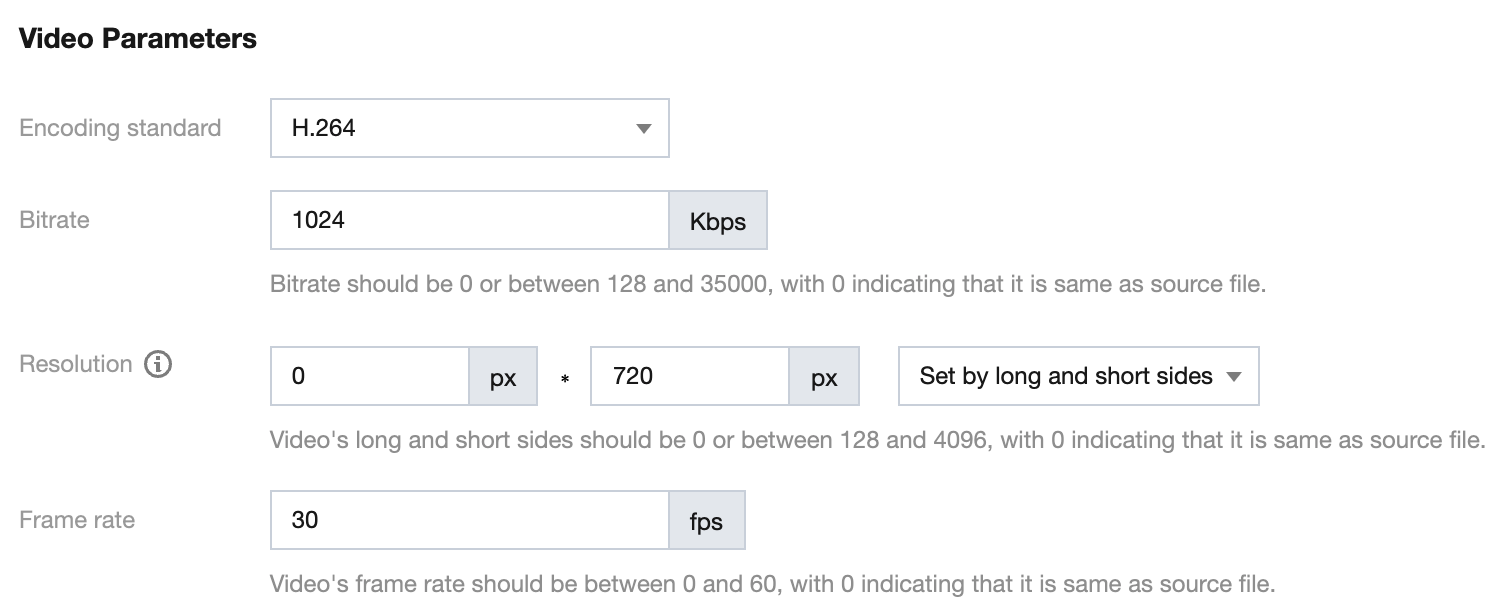
기존 트랜스코딩 템플릿의 해상도는 어떻게 설정합니까?
기존 트랜스코딩 템플릿의 고해상도가 720p인 경우, 너비 비례로 조정합니다. 아래 이미지와 같이 너비와 높이에 따라 설정하도록 선택하고, 높이에 720px, 너비에 0을 입력합니다.
트리거 디렉터리는 트랜스코딩 출력 디렉터리와 동일하면, 트리거 루프가 발생됩니까?
MPS 트리거 디렉터리와 트랜스코딩 출력 디렉터리가 같은 파일 경로인 경우, 트리거 루프가 발생되지 않습니다. 자세한 내용은 트랜스코딩 작업 트리거를 참고하십시오.
트랜스코딩 통계 데이터를 쿼리하는 방법은 무엇입니까?
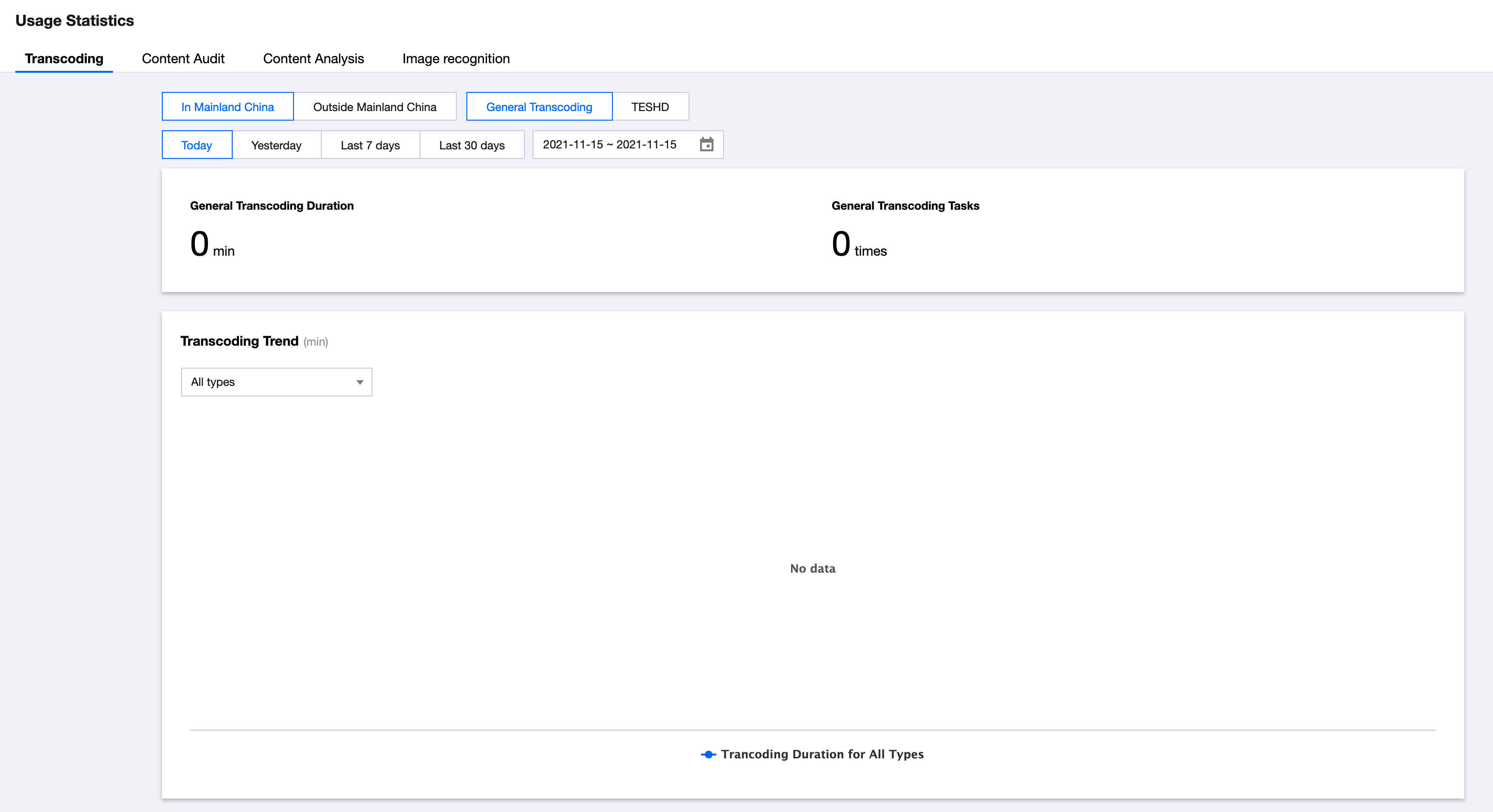
MPS 콘솔에 로그인하여 사용량 통계를 클릭하면 트랜스코딩 통계에 대한 상세 데이터를 제공하는 페이지로 이동합니다.
트랜스코딩 통계 시간 기준은 오늘, 어제, 지난 7일, 지난 30일 및 30일 이내 사용자 지정 시간대입니다.
트랜스코딩 통계의 유형 차원은 일반 트랜스코딩과 TESHD로 구분됩니다.
일반 트랜스코딩 시간: 해당 트랜스코딩 유형 및 기간의 총 트랜스코딩 시간을 표시합니다.
일반 트랜스코딩 작업 수: 해당 트랜스코딩 유형 및 기간의 총 트랜스코딩 작업 수를 표시합니다.
트랜스코딩 유형별 현황: 해당 트랜스코딩 유형 및 기간의 각 트랜스코딩 해상도 추이를 표시합니다.
각 트랜스코딩 세부 정보: 해당 트랜스코딩 유형 및 기간의 트랜스코딩 해상도, 시간, 작업 수를 포함한 세부 정보를 표시합니다.