tencent cloud

TencentDB for DBbrain

Release Notes and Announcements
Release Notes
Announcements
Product Introduction
Overview
Features
Strengths
Use Cases
Feature List
Region List
Purchase Guide
Operation Guide
Cloud Access Management
Self-Built Database Access
Instance Overview
Instance Management
Monitoring and Alarms
Health Report and Kill Session Report Management
MySQL/TDSQL-C for MySQL Performance Optimization
TDSQL for MySQL/MariaDB Performance Optimization
Distributed cache database (Distributed Cache) diagnostic optimization
MongoDB Performance Optimization
Full-Link Analysis
Practical Tutorial
Fixing High CPU Utilization on MySQL Instance
Fixing Lock Conflict on MySQL Instance
How to Address High CPU Utilization Issues in Distributed Cache Instances
Fixing High CPU Utilization in MongoDB Instance
Fixing Short Node Oplog Retention Period in MongoDB Instance
API Documentation
History
Introduction
Introduction
API Category
Making API Requests
Session Killing APIs
Exception Detection APIs
Other APIs
Redis related APIs
Health Report Email Sending APIs
Space Analysis APIs
Slow Log Analysis APIs
Security Audit APIs
Database Audit APIs
Data Types
Error Codes
DBbrain APIs 2019-10-16
FAQs
Self-Built Database Issues
MySQL Performance
Product
Service Level Agreement
Glossary
Contact Us

Enabling Full-Link Analysis

PDF
포커스 모드
폰트 크기
마지막 업데이트 시간: 2024-11-20 14:12:59
Full-link analysis collects, parses, and analyzes audit logs generated in the database system. Once full-link analysis feature is enabled, it assists users in monitoring database activities, identifying potential security issues, and supporting compliance requirements.

Prerequisites

To enable full-link analysis feature for MySQL, TDSQL-C for MySQL, MariaDB, TDSQL MySQL, and PostgreSQL instances, you should first enable the database audit service for each instance. For details on enabling the audit service, see the respective instructions for each database: Activate MySQL Audit Service, Activate TDSQL-C for MySQL Audit Service, Activate MariaDB Audit Service, Activate TDSQL MySQL Audit Service, and Activate PostgreSQL Audit Service.

Directions

1. Log in to the DBbrain Console.
2. Enable Full-Link Analysis.
Method I: Enabling Full-Link Analysis from the Instance Management Page
2.1. In the left sidebar, choose Instance Management, and select the database type.
2.2. Access the instance configuration page using either of the following methods.
The display may vary by page. The following steps use the MySQL database as an example; see the actual page display for details.
Method I: In the Status column of the instance to be enabled, click

.


Method II: In the Operation column of the instance to be enabled, click Configuration.


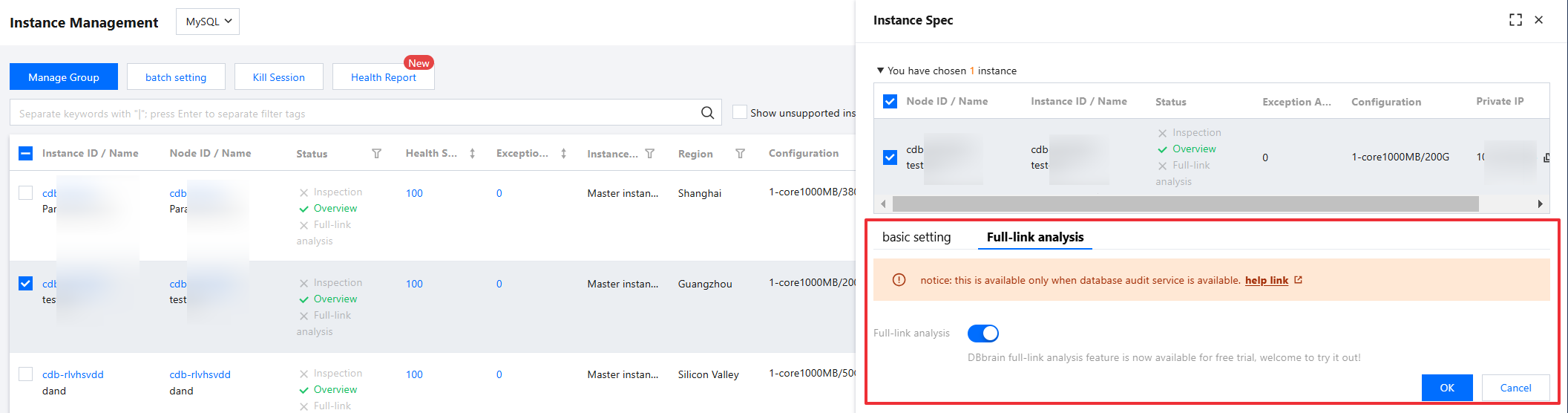
2.3. In the pop-up dialog box, review the selected instance information, select Full-link analysis, toggle the Full-Link Analysis button, and click OK.
Note:
After the full-link analysis feature is enabled, the Full-link analysis > Details Inquiry and Full-link analysis > SQL Analysis pages will display relevant statistical information. For detailed instructions on viewing SQL detail data and SQL analysis data, see Detail Query and SQL Analysis.
To disable the full-link analysis feature, follow the same steps as above. On the instance configuration page, toggle off the Full-Link Analysis button, and click OK .

Method II: Enabling Full-Link Analysis from the Detail Query or SQL Analysis Page
2.1. In the left sidebar, select Full-link analysis > Details Inquiry or Full-link analysis > SQL Analysis.
2.2. At the top of the page, select the database type, and then select node ID, instance ID, or cluster ID.
2.3. In the top right corner of the page, click Configuration.


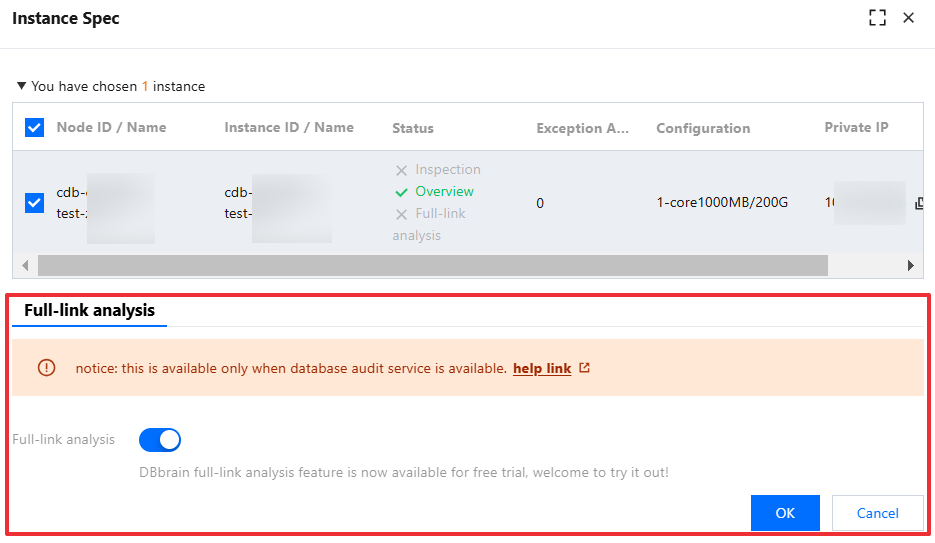
2.4. In the pop-up dialog box, confirm to toggle the Full-Link Analysis button, and click OK.


도움말 및 지원

문제 해결에 도움이 되었나요?

피드백