Kudu Overview
다운로드
포커스 모드
폰트 크기
Apache Kudu is a distributed and horizontally scalable columnar storage system. It improves the storage layer of Hadoop and can quickly analyze rapidly changing data.
Basic Kudu Features
Fast processing of OLAP workloads.
Integration with MapReduce, Spark, and other Hadoop ecosystem components.
Tight integration with Apache Impala, making it a good and mutable alternative to using HDFS with Apache Parquet.
Flexible consistency model.
Strong performance for running sequential and random workloads simultaneously.
High data availability and storage reliability backed by the Raft protocol.
Structured data model.
Kudu Use Cases
Complex scenarios involving both random access and batch data scanning.
Scenarios with high computational load.
Application of real-time predication models, which supports periodic model update based on all historical data.
Data update, which avoids repeated data migration.
Cross-region real-time data backup and query.
Basic Kudu Architecture
Kudu contains the following two types of components:
Master, which is mainly responsible for managing metadata information, listening on servers, and reassigning tablets in case of server failures.
Tablet server, which is mainly responsible for tablet storage and data CRUD.
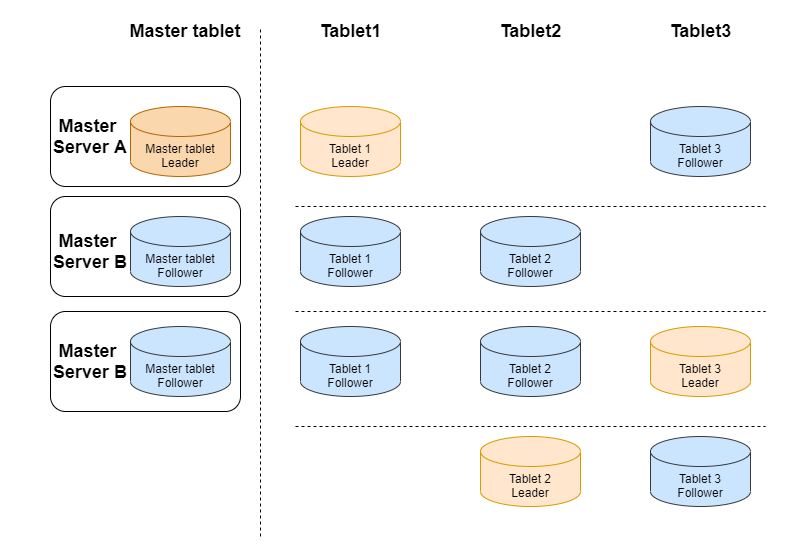
Kudu Usage
EMR 2.4.0 supports the Kudu component. If you check the Kudu component when creating a Hadoop cluster, a Kudu cluster will be created. By default, it contains 3 Kudu masters, and high availability is enabled for it.
Note
All IPs used below are private IPs.
Integrate Impala with Kudu
[172.30.0.98:27001] > CREATE TABLE t2(id BIGINT,name STRING,PRIMARY KEY(id))PARTITION BY HASH PARTITIONS 2 STORED AS KUDU TBLPROPERTIES ('kudu.master_addresses' = '172.30.0.240,172.30.1.167,172.30.0.96,172.30.0.94,172.30.0.214','kudu.num_tablet_replicas' = '1');Query: create TABLE t2 (id BIGINT,name STRING,PRIMARY KEY(id)) PARTITION BY HASH PARTITIONS 2 STORED AS KUDU TBLPROPERTIES ('kudu.master_addresses' = '172.30.0.240,172.30.1.167,172.30.0.96,172.30.0.94,172.30.0.214','kudu.num_tablet_replicas' = '1')Fetched 0 row(s) in 0.12s[hadoop@172 root]$ /usr/local/service/kudu/bin/kudu table list 172.30.0.240,172.30.1.167,172.30.0.96,172.30.0.94,172.30.0.214impala::default.t2
Insert data
[172.30.0.98:27001] > insert into t2 values(1, 'test');Query: insert into t2 values(1, 'test')Query submitted at: 2020-08-10 20:07:21 (Coordinator: http://172.30.0.98:27004)Query progress can be monitored at: http://172.30.0.98:27004/query_plan?query_id=b44fe203ce01254d:b055e98200000000Modified 1 row(s), 0 row error(s) in 5.63s
Query data based on Impala
[172.30.0.98:27001] > select * from t2;Query: select * from t2Query submitted at: 2020-08-10 20:09:47 (Coordinator: http://172.30.0.98:27004)Query progress can be monitored at: http://172.30.0.98:27004/query_plan?query_id=ec4c9706368f135d:f20ccb6e00000000+----+------+| id | name |+----+------+| 1 | test |+----+------+Fetched 1 row(s) in 0.20s
Other commands
i. Perform health check for the cluster
[hadoop@172 root]$ /usr/local/service/kudu/bin/kudu cluster ksck 172.30.0.240,172.30.1.167,172.30.0.96,172.30.0.94,172.30.0.214
ii. Create a table
[hadoop@172 root]$ /usr/local/**service**/**kudu**/bin/kudu table create '172.30.0.240,172.30.1.167,172.30.0.96,172.30.0.94,172.30.0.214' '{"table_name":"test","schema":{"columns":[{"column_name":"id","column_type":"INT32","default_value":"1"},{"column_name":"key","column_type":"INT64","is_nullable":false,"comment":"range key"},{"column_name":"name","column_type":"STRING","is_nullable":false,"comment":"user name"}],"key_column_names":["id","key"]},"partition":{"hash_partitions":[{"columns":["id"],"num_buckets":2,"seed":100}],"range_partition":{"columns":["key"],"range_bounds":[{"upper_bound":{"bound_type":"inclusive","bound_values":["2"]}},{"lower_bound":{"bound_type":"exclusive","bound_values":["2"]},"upper_bound":{"bound_type":"inclusive","bound_values":["3"]}}]}},"extra_configs":{"configs":{"kudu.table.history_max_age_sec":"3600"}},"num_replicas":1}'
iii. Query the created
test table[hadoop@172 root]$ /usr/local/service/kudu/bin/kudu table list 172.30.0.240,172.30.1.167,172.30.0.96,172.30.0.94,172.30.0.214test
iv. View table structure
[hadoop@172 root]$ /usr/local/service/kudu/bin/kudu table describe 172.30.0.240,172.30.1.167,172.30.0.96,172.30.0.94,172.30.0.214 testTABLE test (id INT32 NOT NULL,key INT64 NOT NULL,name STRING NOT NULL,PRIMARY KEY (id, key))HASH (id) PARTITIONS 2 SEED 100,RANGE (key) (PARTITION VALUES < 3,PARTITION 3 <= VALUES < 4)REPLICAS 1
피드백