tencent cloud

Cloud Connect Network

Release Notes and Announcements
Announcements
Product Introduction
Overview
Strengths
Use Cases
Use Limits
Purchase Guide
Billing Overview
Expiration Reminder
Overdue Payment ‍Policies
Getting Started
Getting Started with the CCN
Connecting Network Instances Under the Same Account
Connecting Network Instances Across Accounts
Operation Guide
Operations Overview
Instance Management
Route Management
Bandwidth Management
Cross-Region Traffic Management
Monitoring and Alarms
API Documentation
FAQs
Troubleshooting
Failed to Ping VPCs Connected with a CCN Instance
Service Agreement
Service Level Agreement
Contact Us

Managing Bandwidth

PDF
Focus Mode
Font Size
Last updated: 2024-01-10 14:46:59
For a pay-as-you-go CCN instance billed by monthly 95th percentile, you can view its bandwidth cap and change the bandwidth limit type in the console.

Prerequisites

You have created a CCN instance and associated it with network instances as instructed in Creating a CCN Instance and Associating Network Instances.
Check that there is no route conflict in the route table. For more information, see Viewing Routing Information.

Viewing the Bandwidth of Pay-as-you-go CCN Instances Billed by Monthly 95th Percentile

1. Log in to the CCN console and access the CCN management page.
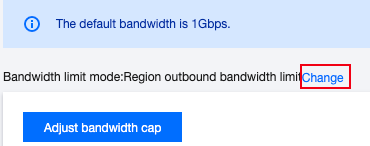
2. On the CCN instance list page, lick the ID/Name of the target pay-as-you-go CCN instance to enter its details page. Click the Bandwidth Management tab. This tab displays the bandwidth cap of the current bandwidth limit type.
Inter-region bandwidth limit

Region outbound bandwidth limit

3. (Optional) Change the bandwidth limit type.
3.1 Click Change on the right of Speed limit mode.


3.2 Select a bandwidth limit type from the drop-down list in the pop-up window.
Note:
Changing the bandwidth limit type will delete existing configurations. The bandwidth cap will be set to 1 Gbps by default. If you require a higher bandwidth, please submit a ticket.
Bandwidth Limit
Description
Region bandwidth out
The outbound bandwidth cap of a single region to other regions
Inter-region bandwidth
The inbound and outbound bandwidth cap between regions

4. Click OK.

Help and Support

Was this page helpful?

Help us improve! Rate your documentation experience in 5 mins.

Feedback